So some people will read the previous blog and say why are you being
so negative? See I don't see it that way, I see it as a place that
has a great culture that wants to embrace change and continuous
improvement. I also see this as massive opportunity to try out some
of the ideas that I will present. A lot of these ideas are not new
topics, however they have been tailored for the environment that I am
in.
The concept that I am calling this is Lean Projects.
A way for us to embrace lean and agile methodologies in an agency
environment.
Kanban
Kanban
is a method for developing software products and processes with an
emphasis on just-in-time delivery while not overloading the software
developers. In this approach, the process, from definition of a task
to its delivery to the customer, is displayed for participants to see
and developers pull work from a queue.
The thing to note from the above statement is that
Kanban works on the concept of a pull
model.
Visualise
Workflow
As stated above, one of the challenges that we face is
to visualise our workflow. One way to get started is to map the value
stream. The idea behind value stream mapping is to sketch out how
you are working as this will help everyone to understand how the
process works.
From this visualisation we can create what is called a
Kanban board.
The idea behind this board is to have a way to show your team what
your value stream looks like. An example of a board looks like this:
This board is the single point of truth for everyone
working on a product.
Limit
Work In Progress
The most important part of the Kanban process is to
limit your WIP.
In Kanban,
we don’t juggle. We try to limit what we are doing, and get the
most important things done, one by one, with a clear focus. It’s
not uncommon to find that doing ten things at once takes a week, but
doing two things at once takes hours, resulting in twenty things
being done by the end of the week.
Measure
and Manage Flow
The important aspect is to make sure that each of the
features that is on the board actually goes through to the last step
of your flow. We set limits to make sure we don't start picking up
more features than the ones already started.
Some teams have the concept of stop
the line, where the team gets together to make sure the pipeline
clears up for the next features to be pulled in.
Fortunately Kanban has a few ways for us to measure the
pipeline, as without measurement we can't improve on things.
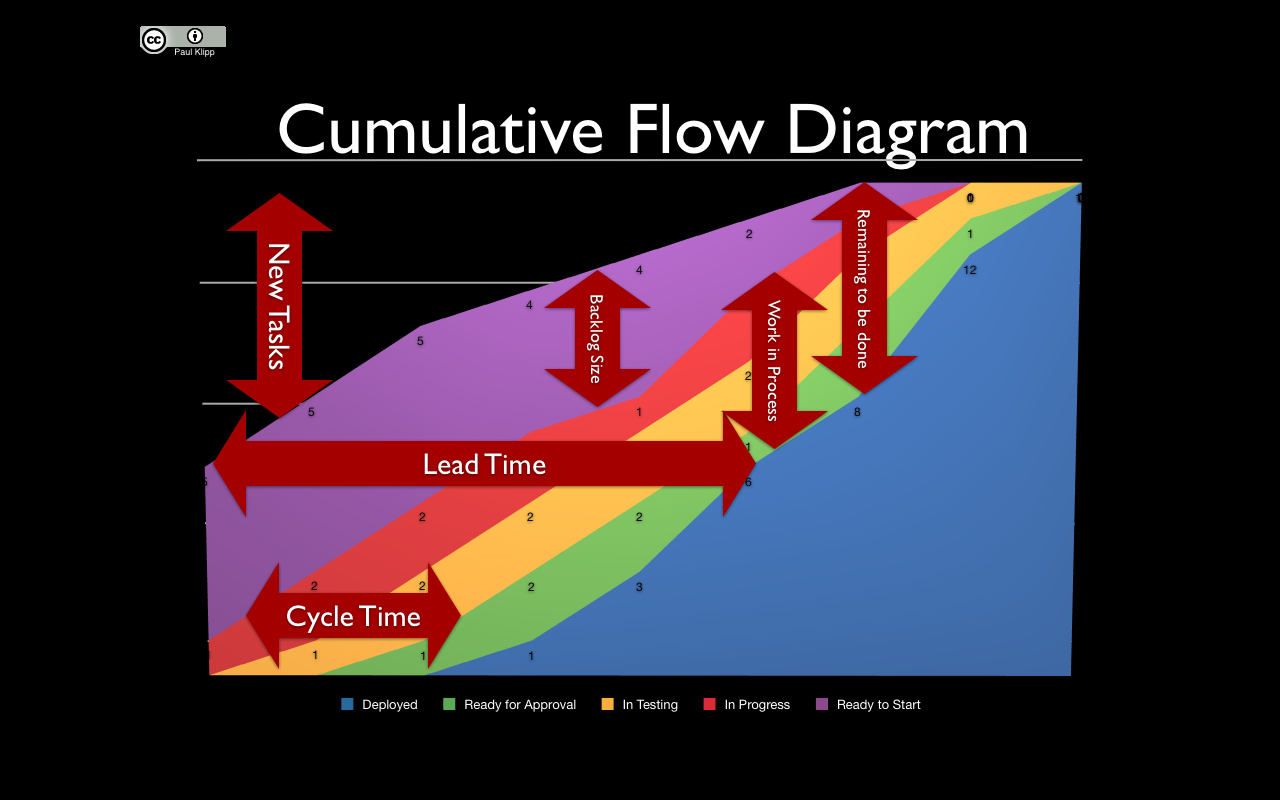
Cumulative
Flow Diagrams
This diagram is an area graph that depicts the
quantity of work in a given state, showing arrivals, time in queue,
quantity in queue, and departure. This is a great way to
visualise
how we are churning features through our work flow.
Lead
Time
The term lead
time (LT) is just a fancy way to say time to market. It’s
essentially the time that elapses (on the calendar) from something is
ordered until it is received. In software development, a feature is
ordered when someone (like the product owner) asks someone else (the
team) to implement it. The same feature is received when it is
deployed to the production system and ready to be used by end users.
Why is this important?
Well, we can track how long a feature took. This
is a really powerful metric, as it can be used to eliminate the
entering of hours spent into a system.
How can this be used in
Lean Projects? Well when I estimate I always like to estimate in
terms of effort,
meaning that it is easier for me to think about how easy/hard
something is rather than how long it will take. This
effort for me is measured
using t-shirt sizes, e.g. S, M and L. Now
if we start tracking all the features that have been sized using a
t-shirt size we can start measuring the lead time for
each of these features. We
can then take the average of the lead time and this amount
can be used to drive the estimates of the next feature.
Make
Process Policies Explicit
As mentioned on wikipedia:
Until the mechanism of a process is made explicit it
is often hard or impossible to hold a discussion about improving it.
Without an explicit understanding of how things work and how work is
actually done, any discussion of problems tends to be emotional,
anecdotal and subjective. With an explicit understanding it is
possible to move to a more rational, empirical, objective discussion
of issues. This is more likely to facilitate consensus around
improvement suggestions.
Feedback
Loops and Improvement Opportunities
The
way to improve this
is
to provide a way to have some form of feedback loop. I am big fan of
Agile
Retrospectives.
The
idea is to meet at a
regular
time to reflect on how everything
is going.
With Lean Projects we need to reflect on how efficient
the process is
and ask the right questions. The way that we can do that is by using
the 5
Why's Technique.
A
good metric for improvement is reducing
lead
time,
as
this will help you deliver all features in a better way.
Your people are your most important resource.
Ensuring their support and cooperation is vital for all major
projects.
Specification
By Example
Specification
by Example is a set of process patterns that facilitate change in
software products to ensure that the right product is delivered
efficiently.Wikipedia summarises
this quite well:
Deriving scope from goals
Specifying collaboratively – through all-team
specification workshops, smaller meetings or teleconference reviews
Illustrating requirements using examples
Refining specifications
Automating tests based on examples
Validating the underlying software frequently using
the tests
Evolving a documentation system from specifications
with examples to support future development
So what does this all mean for Lean Projects? Well the
basic idea is that we want to find a common language to describe the
requirements through as a set of examples. For this work we need to
do this collaboratively and to make sure that the requirements don't
become stale as they will serve as documentation.
Before we can think of an example, we need to think of
the value that we are adding. The best format I have found is as
follows:
In order to [business value]
As a [role]
I want to [some action]
The first part is the most important and it should
reflect one
of these values:
Also think about the role that this feature is for. The
reason I mention this is because sometimes we build a feature for the
“Highest
Paid Person's Opinion”, which most of the time adds no value. A
scenario or example has the following format:
Given [context]
When I do [action]
Then I should see [outcome]
The Given step is where you set up the context
of your scenario. Every scenario starts with a blank slate. The When
step is where you exercise the application in order to accomplish
what needs testing. Finally, the Then step is where you verify
the result.
Feature: Login
In order to access the website
content
As a website user
I need to log in to the
website
Scenario: valid
credentials
Given I am presented with the ability to log in
When I provide the
email address "test@mywebsite.com"
And I provide the
password "Foo!bar1"
Then I should be
successfully logged in
Scenario Outline:
invalid credentials
Given I am presented with the ability to log in
When I provide the
email address <email>
And I provide the
password <password>
Then I should not be
logged in
Examples
| email
| password |
| test@mywebsite.com |
Foo!bar2 |
| test@mywebsite.com | Foo
|
Lean
Software Development
Lean software development is a translation of lean
manufacturing and lean IT principles and practices to the software
development domain. Adapted from the Toyota Production System, a
pro-lean subculture is emerging from within the Agile community.
Eliminate
Waste
Waste is anything that interferes with giving
customers what they value at the time and place where it will provide
the most value. Anything we do that does not add customer value is
waste, and any delay that keeps customers from getting value when
they want it is also waste.
unnecessary code or functionality
starting more than can be completed
delay in the software development process
bureaucracy
slow or ineffective communication
partially done work
defects and quality issues
task switching
Build
Quality In
The idea here is to start with the frame of mind that
quality is important and needs to be done from the start. Your
goal is to build quality into the code from the start, not test it in
later. You don’t focus on putting defects into a tracking system;
you avoid creating defects in the first place.
Pair
Programming
Pair Programming is an agile software development
technique in which two programmers work together at one workstation.
One, the driver writes code while the other, the observer, reviews
each line of code as it is typed in. The two programmers switch roles
frequently.
Test
Driven Development
Test-driven development (TDD) is a software
development process that relies on the repetition of a very short
development cycle: first the developer writes an (initially failing)
automated test case that defines a desired improvement or new
function, then produces the minimum amount of code to pass that test,
and finally refactors the new code to acceptable standards.
Continuous
Integration
Continuous integration (CI) is the practice, in
software engineering, of merging all developer workspaces with a
shared mainline several times a day.
Refactoring
Code refactoring is a "disciplined technique for
restructuring an existing body of code, altering its internal
structure without changing its external behaviour", undertaken
in order to improve some of the nonfunctional attributes of the
software. Advantages include improved code readability and reduced
complexity to improve the maintainability of the source code, as well
as a more expressive internal architecture or object model to improve
extensibility.
Create
Knowledge
We
have all been in the situation where we have only one person that
knows the codebase. There will always naturally be individuals that
are stronger than others in specific areas. This is what makes great
cross functional teams, however having only
one
person know something is what is called a single
point of failure.
It
is important that the whole team has an understanding of how the
system works, so
that we
can eliminate single points of failure. However this is easer said
than done as not everyone is always interested in every aspect of
every system.
The
following
provide
great ways to create knowledge:
Pair Programming
Code reviews
-
Training
Defer
Commitment
Emergency responders are trained to deal with
challenging, unpredictable, and often dangerous situations. They are
taught to assess a challenging situation and decide how long they can
wait before they must make critical decisions. Having set a time-box
for such a decision, they learn to wait until the end of the time-box
before they commit to action, because that is when they will have the
most information.
Basically we want to decide as late as possible,
specially for irreversible decisions.
Deciding too early, you run the very likely risk that
something significant will have changed, meaning your end product
might meet the spec, but it might still be the wrong product! This is
one reason why so many projects fail.
Deliver
Fast
If
we can deliver software fast that means we can get real feedback from
actual users, which is the reason you are building the feature in the
first place. Another
really great side effect of delivering software fast is that you
would have had to solve the way you release your features. In order
to release quickly means that you need to do it in a repeatable way,
this means automation. The
way to achieve this is through continuous delivery.
Continuous delivery is a pattern language in growing
use in software development to improve the process of software
delivery. Techniques such as automated testing, continuous
integration and continuous deployment allow software to be developed
to a high standard and easily packaged and deployed to test
environments, resulting in the ability to rapidly, reliably and
repeatedly push out enhancements and bug fixes to customers at low
risk and with minimal manual overhead.
Respect
People
I think it’s important to treat everyone with the
same respect, whatever their job. It doesn’t matter whether
they’re the CEO, a developer, project manager, the receptionist or
the cleaner, respect everyone equally.
This comes back to the bottom up approach, giving people
the responsibility to make decisions about their work. It is
important to build knowledge and develop people who can think for
themselves.
Respecting people means that teams are given general
plans and reasonable goals and are trusted to self-organise to meet
the goals. Respect means that instead of telling people what to do
and how to do it, you develop a reflexive organisation where people
use their heads and figure this out for themselves.
Optimise
The Whole
A lean organisation optimises the whole value stream,
from the time it receives an order to address a customer need until
software is deployed and the need is addressed. If an organisation
focuses on optimising something less than the entire value stream, we
can just about guarantee that the overall value stream will suffer.
Looking at the whole picture is important. In the past I
have spent time just optimising the development practices, however I
believe that if you don't love what you are building then what is the
point. We should all care about the overall value stream.
Final
Thoughts
All of these thoughts have been going around in my head
for years and I am truly excited to put these ideas to work in such a
vibrant environment. I look forward sharing my findings as I love to
see how all these thoughts change over time.